
Work tracking: GitHub Issues, Jira, and custom systems
Use Work tracking in the shared workspace (or Cleetus: Open Work Tracking from the command palette) to connect a tracker, search work items, inspect descriptions/acceptance criteria, and prepare a Conversation or team. Agents can read configured trackers through engine-neutral tools. Custom systems can also expose atomic claim, renewal, and release operations.
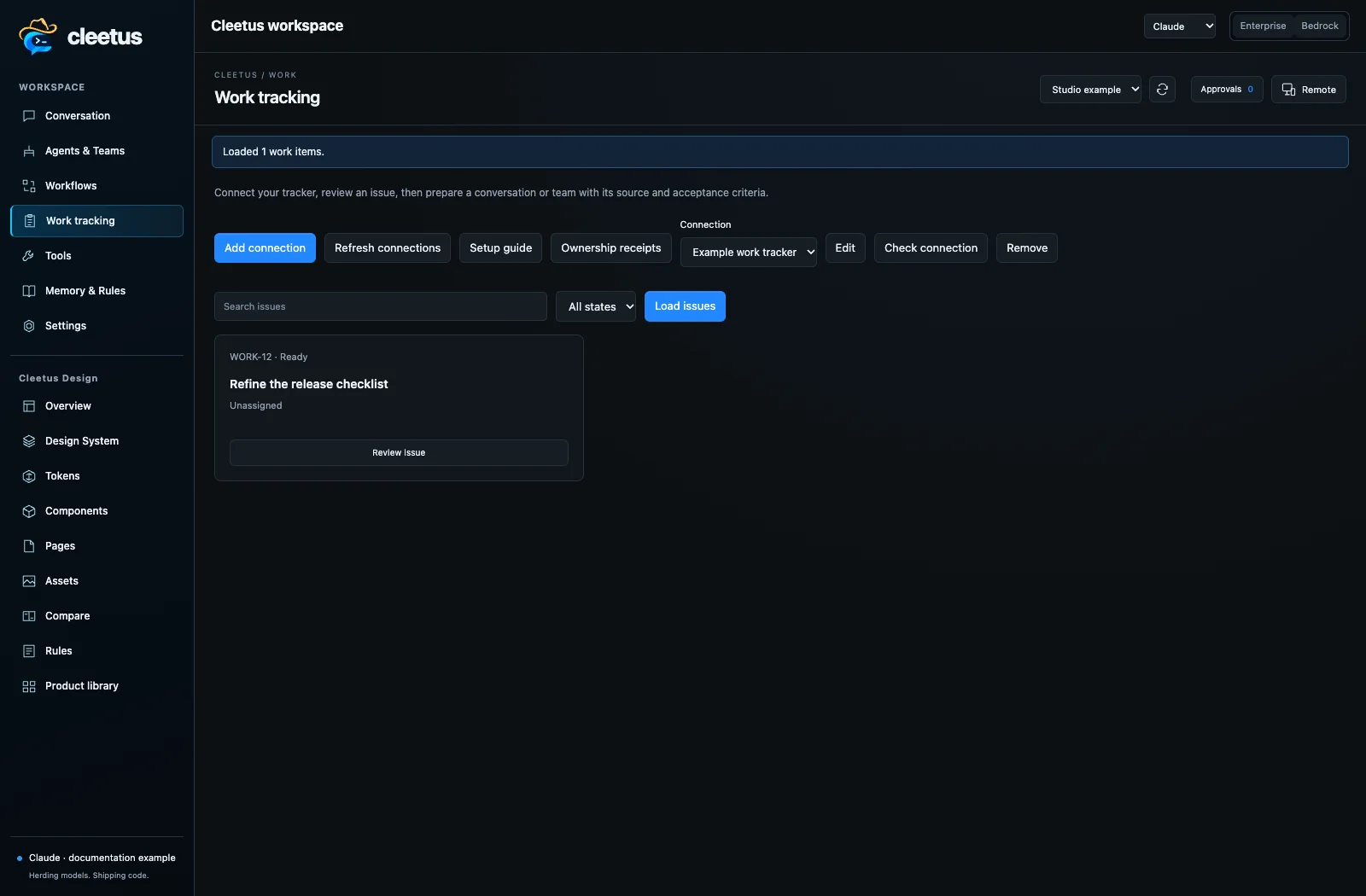
Connect a tracker
- Choose Add connection and select GitHub Issues, Jira Cloud, Jira Data Center, or Custom REST tracker.
- Enter a connection name and HTTPS API base URL. Use
https://api.github.comfor GitHub.com; for GitHub Enterprise use its API root, commonlyhttps://your-host/api/v3. - Set
owner/repositoryfor GitHub or the project key for Jira. Jira Cloud also needs the account email. A Jira acceptance-criteria field can be mapped by itscustomfield_12345ID. - Enter a token or the name of an environment variable available to the VS Code host. Jira Cloud uses email/API-token authentication; Jira Data Center and GitHub use bearer tokens. Custom adapters support bearer, a named token header, or explicitly unauthenticated access.
- Save, then Check connection. This validates access to the configured repository/project, or the custom list endpoint.
- Choose Load issues. Results are paginated; Load more continues. GitHub search accepts its issue-search syntax, scoped and filtered to the configured repository. Jira accepts a JQL condition within the configured project; use
assignee = currentUser()rather than a complete query withORDER BY.
Use tokens with the required repository/project scope and organization SSO access. Tokens stay in VS Code SecretStorage; profile JSON contains metadata and credential references, not plaintext tokens. Environment references take precedence over a typed token. Updating a service/account requires re-entering its stored credential. Claims must be reconciled before changing or removing a connection.
Authentication is token-based in this release; there is no built-in OAuth registration flow. Enterprise services must have certificates trusted by the local Node.js service. Do not disable TLS validation to connect.
From an issue to development
Open Review issue to inspect the title, source, status, description, and mapped acceptance criteria. Draft in Conversation inserts a fresh task brief without sending it. Prepare team opens the normal Software development team setup, where you can select another template and adjust members, models, effort, prompts, and tools.
The bounded brief includes the tracker connection ID, work-item ID, source URL, task evidence, and configured ownership context. Work-item content is treated as untrusted evidence, not higher-priority instructions. Long fields are marked as truncated so the team goal retains room for acceptance and ownership context. Agents should call work_tracker_get to refresh the complete issue before implementation. Choose the target project before starting agents.
Create issue and Post comment publish only when their explicit submit buttons are clicked. Custom write buttons remain unavailable until their paths are configured. Writes are not automatically retried; if a request times out, check the tracker before trying again. Issue workflow transitions and automatic issue closure are not implemented in this release.
Visual pull-request flow
Choose a GitHub connection, then Pull requests. Open View PR flow to inspect four stages: Source, Tooling checks, Review, and Merge. Refresh evidence reloads the provider results; Open PR in GitHub opens the authoritative remote page.
The tooling cards come from GitHub check runs and commit statuses for the PR's current head SHA. SonarQube, Snyk, tests, build pipelines, and custom tooling appear when those systems publish results to GitHub. Cleetus does not turn a local tool run or a project-wide SonarQube result into a commit-specific PR pass. Configure the tool's GitHub integration or CI workflow to report its result.
In the GitHub connection settings, enter Expected PR check names, one exact reported name per line. An expected check absent from the current head appears as missing. These are your expectations, not a fetched copy of branch protection or repository rulesets.
| Evidence state | Meaning |
|---|---|
| Passed | Every collected check reports success and all evidence sources completed. |
| Pending | At least one check is queued, running, waiting, or pending. |
| Failed | At least one check reports a failure or another unsuccessful terminal conclusion. |
| Attention | Collected results include neutral or skipped checks; these are not shown as passes. |
| Unknown / missing | No usable evidence, an unavailable source, incomplete pagination, or an absent expected check. |
| Stale | The PR head changed while evidence was loading. Refresh before relying on the result. |
Review cards distinguish approvals on the current head from earlier-commit reviews. Changes requested remain visible. Mergeability may be unknown while GitHub computes it. Branch/ruleset requirements are not verified by this view, and this release has no merge action. Green tooling cards are not permission to merge.
The view checks head-commit evidence only. Checks published exclusively against GitHub's synthetic merge/test commit are not included. Evidence collection is bounded to 500 records per source; a limit or API/permission failure produces a warning rather than a false pass. For private repositories, the token needs the relevant pull-request, checks, and commit-status read access in addition to issue access.
Agent tools and ownership
| Tool | Purpose |
|---|---|
work_tracker_connections |
List configured connections without credentials. |
work_tracker_list |
Search/page through work items. |
work_tracker_get |
Read an issue and its acceptance/ownership context. |
work_tracker_pull_requests |
List configured GitHub repository PRs. |
work_tracker_pr_checks |
Read current-head checks, review and merge evidence without merging. |
work_tracker_claim |
Acquire an atomic custom-tracker claim; only proceed after success. |
work_tracker_renew |
Renew a claim using the saved fencing generation, from the owning Cleetus session. |
work_tracker_release |
Release that session's claim using the saved fencing generation. |
An engine may prefix these names through MCP. Both Claude and Codex receive the registered tools through Cleetus's core. Normal tool permissions still apply. To enable ownership writes, turn on Allow agent ownership operations and configure a custom tracker's claim/renew/release paths and fencing-generation mapping.
A claim is not an assignment label. GitHub/Jira browsing and writes are supported, but their assignment APIs are not presented as atomic leases. The claim tools reject trackers without a configured atomic ownership contract. Server-side admission, active-goal checks, dependencies, lease conflicts, and authorization remain authoritative.
Claims are bound to the authenticated Cleetus session, not an agent-supplied actor ID. A second local session cannot renew/release the first session's receipt. Concurrent claims are reserved locally before the network call; the server arbitrates other machines/processes. Lease generation is saved locally and supplied to renewal/release. Agents must renew before expiry; this release does not run an automatic background heartbeat.
A network failure after a claim can leave ownership uncertain. Cleetus retains an uncertain receipt and blocks blind reclaim. Ownership receipts → Reconcile locally is a human recovery path: inspect and reconcile the remote lease first, then forget the local record. Forgetting does not release remote work. Lease conflicts can also indicate expiry or loss of ownership; stop editing and reconcile. Reload does not automatically resume a claiming agent.
Custom REST adapter
Custom integrations are configuration, not product-specific Cleetus code. Endpoint paths are relative to your HTTPS API root. Dot-separated mappings address nested JSON fields. Unconfigured writes stay unavailable. Example for a command-center-style API:
{
  "listPath": "/api/v1/work",
  "readPath": "/api/v1/work/{id}",
  "itemsPath": "items",
  "nextCursorPath": "nextCursor",
  "detailPath": "",
  "idField": "id",
  "titleField": "title",
  "descriptionField": "description",
  "statusField": "status",
  "criteriaField": "criteria",
  "labelsField": "labels",
  "assigneesField": "assignees",
  "contextFields": ["goalId", "repoId", "dependencies", "owner", "lease"],
  "queryParam": "search",
  "cursorParam": "cursor",
  "limitParam": "limit",
  "stateParam": "status",
  "openState": "Ready",
  "closedState": "Done",
  "auth": "bearer",
  "claimPath": "/api/v1/work/{id}/claim",
  "renewPath": "/api/v1/work/{id}/renew",
  "releasePath": "/api/v1/work/{id}/release",
  "claimDefaults": {"ttl": 60000},
  "generationPath": "lease.generation",
  "renewGenerationPath": "generation",
  "generationField": "generation",
  "createPath": "/api/v1/work",
  "createDefaults": {"goalId": "YOUR-GOAL-ID"},
  "writeTitleField": "title",
  "writeDescriptionField": "description",
  "createdIdField": "id",
  "commentPath": "/api/v1/work/{id}/comments",
  "commentBodyField": "message"
}
Replace required creation defaults with real permitted values, or leave createPath empty for a read/claim-only connection. Use a scoped worker credential with board-read and the specific ownership/write permissions the server requires. A team-bound service may require coordinator admission before a worker can claim; the adapter does not bypass it or enable the service's global scheduler.
A blank detailPath maps the response root; for { "data": { ... } }, set it to data. Blank itemsPath supports a root array. Cursor mapping supports string or numeric next cursors. With a nonstandard auth header, use auth: "header" and tokenHeader: "X-API-Key". Optional issueUrl is an HTTPS UI template containing {id}; when absent, Open in tracker goes to the configured API base.
List calls use GET with the configured query/state/cursor/limit parameters. Creation, comments, claims, renewal and release use POST JSON. Ownership paths must contain {id}. A claim response must expose a fencing generation/token as a string or number; subsequent requests send the saved value through generationField. The adapter does not guess a scheduler or worker protocol from a URL.
Service execution
Tracker requests and PR evidence aggregation run in the local Cleetus service. The extension brokers SecretStorage access over the private process channel. Environment credentials must be available when the service starts. The service preserves provider authorization, session-bound ownership, fencing generations, and uncertain-write handling; a process restart does not grant permission to repeat a claim or write.
Storage and limitations
work-tracking.json in your Cleetus profile stores connection metadata; work-claims.json stores local session-bound ownership receipts. Tokens remain in the VS Code secure store or environment. Removing configuration does not change remote issues. Do not copy credential references between installations expecting a transferred login.
Provider HTTP failures, rate limits and ownership conflicts remain visible. Only authenticated, permitted records are available. Custom APIs with OAuth-only login, non-REST transports, different write verbs, or a different ownership protocol need an additional adapter capability. Configure only endpoints you trust; connected issue data can include internal project information and becomes engine context when you draft/send work.
API references: GitHub check runs, GitHub pull requests, GitHub Issues REST, Jira Cloud enhanced JQL search.