
Workflows and automation
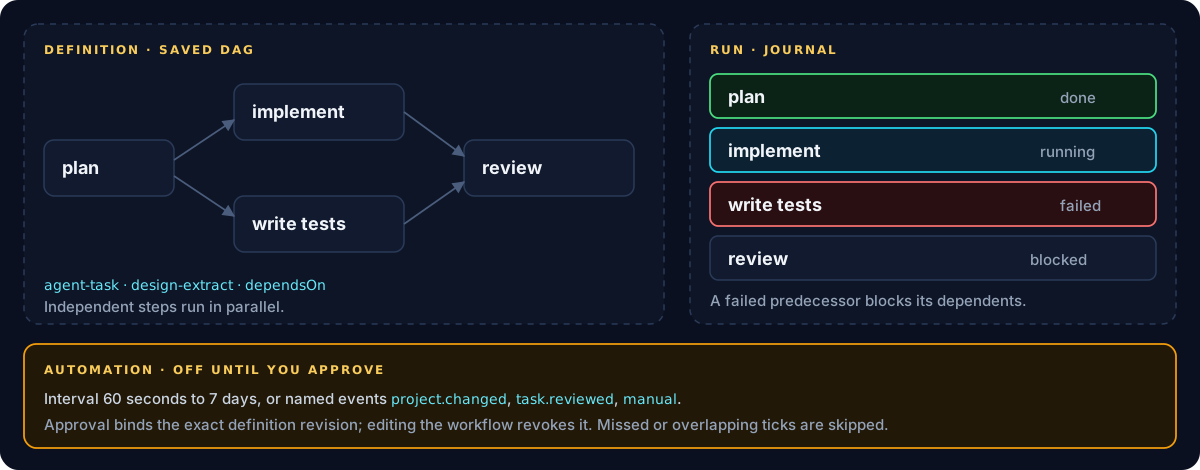
A workflow is a saved, reusable plan: a directed acyclic graph of steps with dependencies. Each run keeps its own journal, so you can edit the definition without losing what earlier runs did. Automation can start runs on a schedule or on named events, but only after you approve that exact definition.
Create a workflow
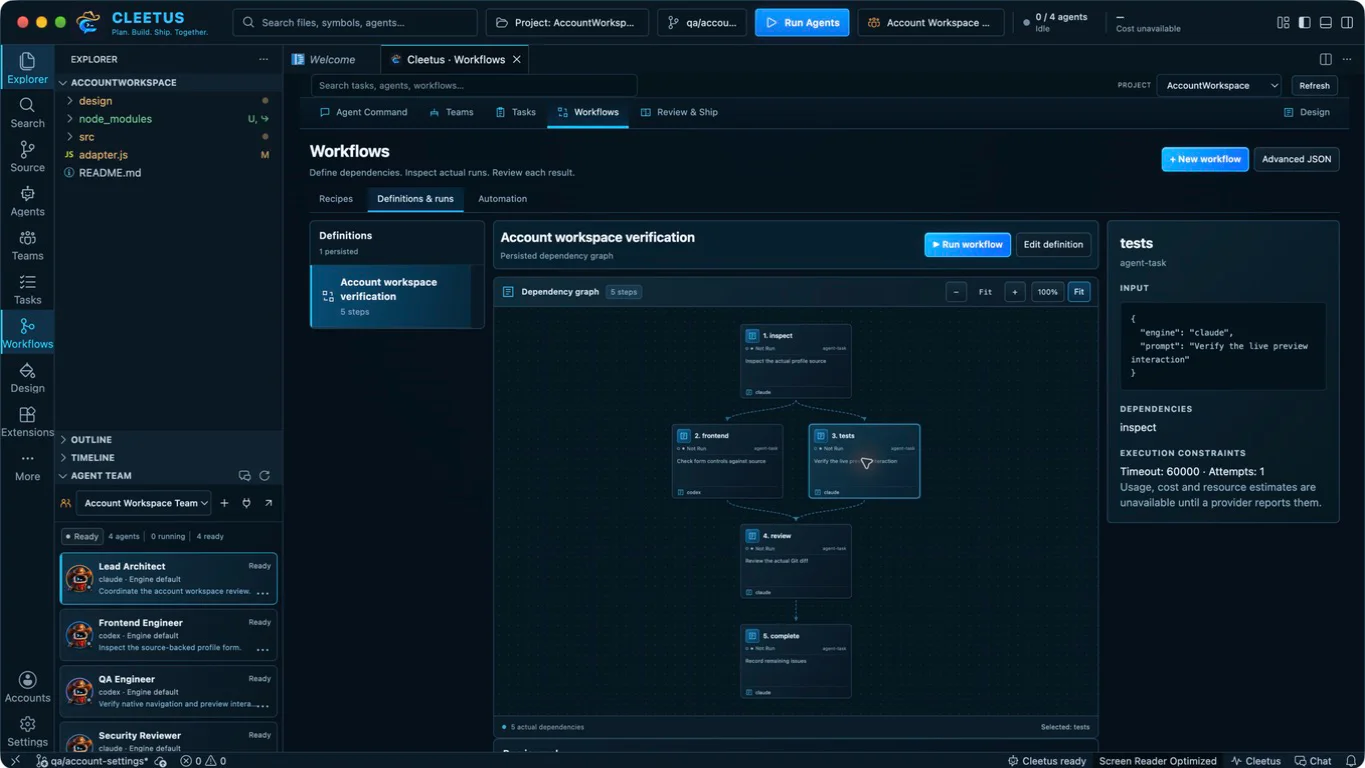
- Open Workflows and choose a recipe: feature work, investigation, review, documentation, tests or deployment preparation.
- Enter a bounded goal and the model and effort, then create the saved DAG. Saving never runs it.
- Inspect the canvas. Drag to pan, + and − to zoom, 100% for actual size or Fit to see it all.
- Run workflow shows every step for approval. The run journal then records what actually happened, separately from the definition.
Write steps by hand
Advanced JSON edits the definition directly. This is the shape a recipe produces:
{
  "name": "Settings refactor",
  "steps": [
    {
      "id": "plan",
      "action": "agent-task",
      "dependsOn": [],
      "timeoutMs": 1800000,
      "input": {
        "engine": "claude",
        "model": "",
        "effort": "high",
        "title": "Planner",
        "prompt": "Plan the settings refactor…"
      }
    },
    {
      "id": "implement",
      "action": "agent-task",
      "dependsOn": ["plan"],
      "input": { "engine": "codex", "title": "Implementer", "prompt": "…" }
    },
    {
      "id": "tests",
      "action": "agent-task",
      "dependsOn": ["plan"],
      "input": { "engine": "codex", "title": "Tester", "prompt": "…" }
    },
    {
      "id": "review",
      "action": "agent-task",
      "dependsOn": ["implement", "tests"],
      "input": { "engine": "claude", "title": "Reviewer", "prompt": "…" }
    }
  ]
}
| Field | Rules |
|---|---|
id |
Unique, letters, digits, _ and -, up to 64 characters |
action |
An allowlisted action: agent-task for an engine request, design-extract for a Design extraction |
dependsOn |
Distinct IDs of existing steps. Cycles are rejected when you save |
input |
Up to 16 KiB. For agent-task: engine, optional backend, model (empty for the engine default), effort, title and a required prompt of up to 12,000 characters |
timeoutMs |
10 ms to 1 hour; defaults to 60 seconds. Recipes set 30 minutes for agent steps |
maxAttempts |
1 to 3, and above 1 only for actions marked retry-safe |
How runs execute
- Independent steps run in parallel, and dependents wait for their predecessors.
- Each agent step starts its own session in the project and receives its predecessors' results as context, to verify rather than trust.
- A failed predecessor blocks its dependents. Nothing downstream runs on a broken result.
- Side effects aren't retried. Agent and Design actions aren't retry-safe, so they run once.
- Cancellation is a request. Work that hasn't settled stays uncertain until you check it.
- Interrupted runs aren't replayed after a restart.
- Editing a definition preserves earlier runs and their journals.
Automation
Workflows → Automation → + Add automation attaches a trigger to a workflow:
| Trigger | Details |
|---|---|
| Interval | Every 60 seconds to 7 days |
project.changed |
A named host event, not a file watcher |
task.reviewed |
Fires when a task review is recorded |
manual |
Emit it yourself with Emit an event |
New automation starts disabled. Enabling or changing it needs your approval of the exact definition revision and trigger, so editing the workflow later revokes that approval until you approve again.
- Missed and overlapping intervals are skipped, never queued up.
- A failed or uncertain dispatch stops future automation for that workflow until you review it.
- Reusing an event ID returns the receipts it already produced; New event ID requests a distinct delivery.
- Emit an event needs approval too.
Inspect dispatch history next to the run it started. Disable or remove an automation to stop future dispatches.
Workflows, recipes or teams?
| Use | When |
|---|---|
| A conversation | One bounded task |
| A conversation recipe | A reusable prompt where one engine decides how to delegate |
| A team | Explicit roles, handoffs and reports scheduled by Cleetus |
| A workflow | A repeatable multi-step plan with dependencies, a journal per run and optional automation |
Tasks · Agent teams · Design