
Account API and device sign-in
Cleetus accounts are shared by cleetus.app, this portal, the IDE, the iPhone companion and the CLI. Clients sign in with OpenID Connect against auth.cleetus.dev and check membership at api.cleetus.dev. This guide describes the hosted identity contract and the account UI in published Cleetus IDE 0.2.0 and extension 1.12.1. See Install and update for downloads and verification instructions. Artifact acceptance does not establish a fresh installed-app account or credential-persistence check.
Endpoints
| Sign-in domain | https://auth.cleetus.dev |
| Authorize | https://auth.cleetus.dev/oauth2/authorize |
| Token | https://auth.cleetus.dev/oauth2/token |
| Sign out | https://auth.cleetus.dev/logout |
| Issuer and keys | Published by the issuer's /.well-known/openid-configuration |
| API | https://api.cleetus.dev |
| OpenAPI | https://api.cleetus.dev/openapi.json |
The API console shows the live issuer, client IDs and redirect URIs for the environment you are viewing.
Use Account in the IDE
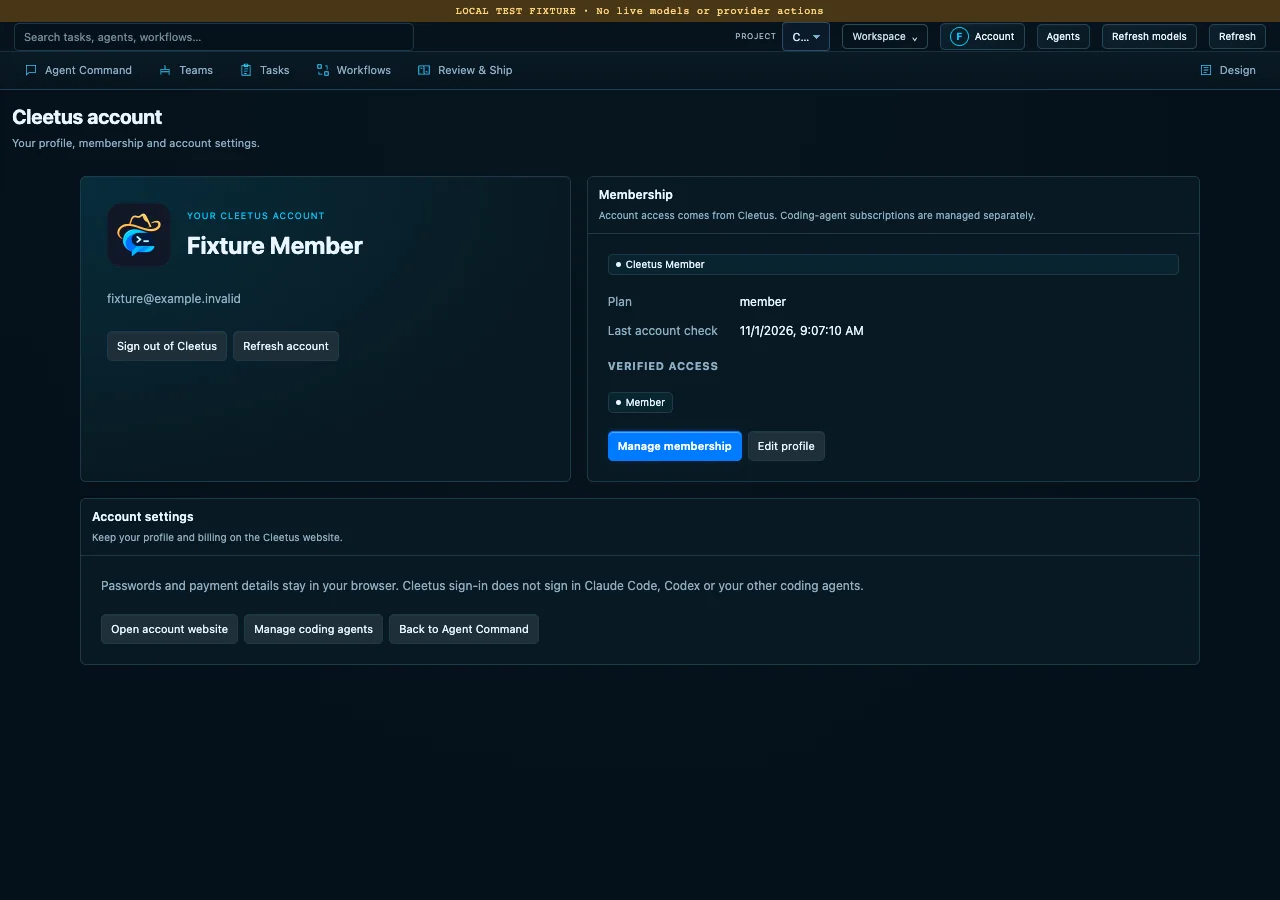
Local browser fixture, with a visible test strip and fixture identity. This image does not show a live account, payment or verified customer entitlement.
- Open Account in Studio or the native title bar. In a compatible VS Code build, run Cleetus: Account and Membership from the command palette.
- Choose Sign in to Cleetus. Your system browser opens Cleetus's hosted sign-in page, where you can use your password manager and an existing Cleetus browser session. The editor does not collect your password or verification code.
- Return to the account view to inspect your profile, membership and Verified access. Choose Refresh account when you need a fresh service check.
- Use Manage membership or Edit profile for the hosted account controls. Payments and profile changes stay on the Cleetus website.
Cancel sign-in ends the local attempt. A delayed callback cannot sign you back in after cancellation or logout. Sign-in has a five-minute deadline. If another window owns the registered callback port, finish or cancel that attempt first; Cleetus does not guess another port.
A Cleetus account is separate from Claude Code, Codex and ACP provider sign-in. It does not supply their subscriptions, model access or credentials. Native provider login, trust and channel consent remain with the provider. See the IDE account section and coding-agent setup.
Browser return page
IDE 0.2.0 and extension 1.12.1 show a branded Return to Cleetus page after the hosted sign-in response reaches the local callback. Response received means the response arrived; it does not confirm a verified account or membership. Return to the editor where you started sign-in and check Account for the result. You can close the browser tab.
The callback page clears the one-time query parameters from its address and loads no external images, fonts or scripts. It does not display identity, authorization codes or tokens. Provider sign-in remains separate.
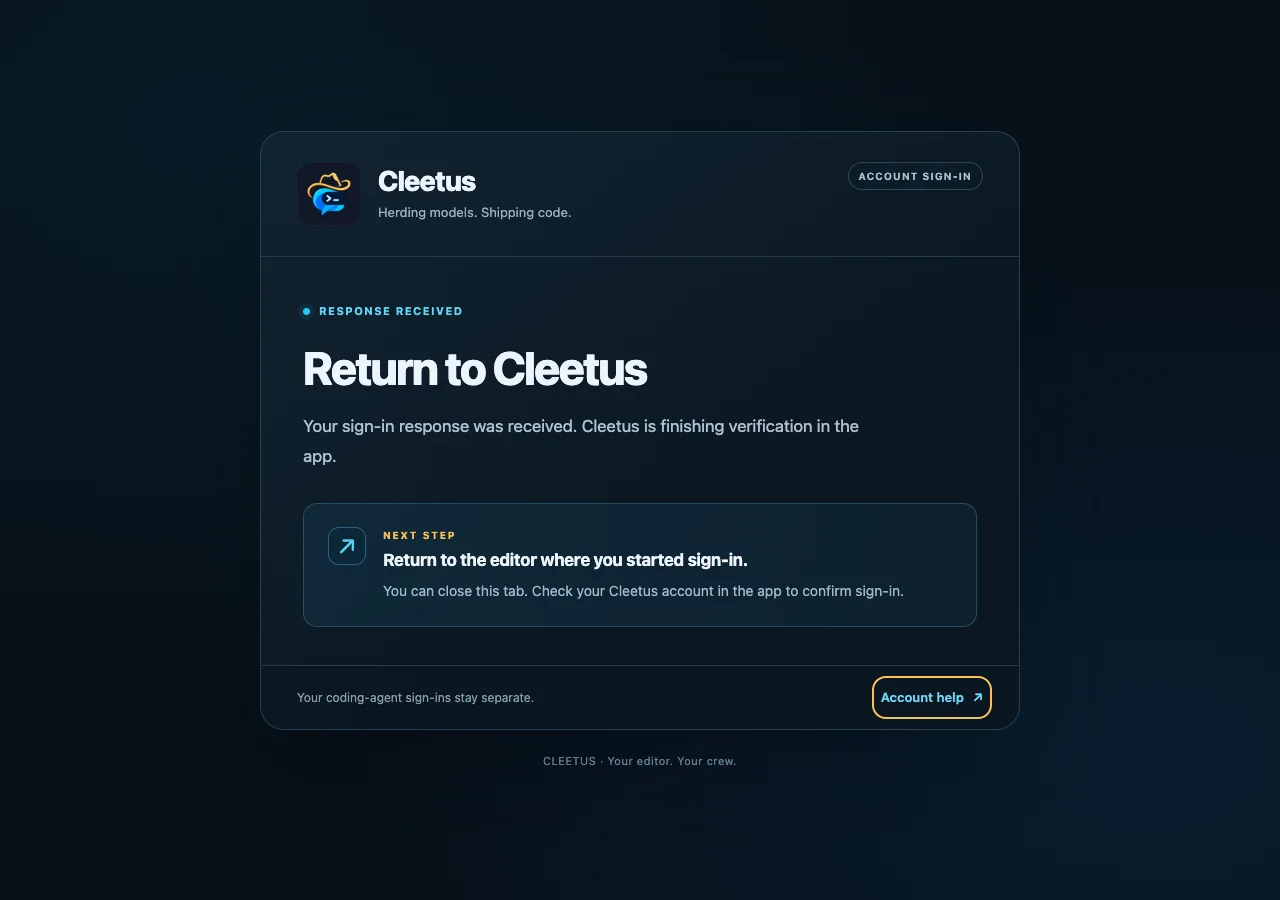
Local screenshot fixture of the return page. It contains no account identity or OAuth response data and does not establish a live sign-in or accepted installer.
Implement desktop sign-in
Use the authorization code flow with PKCE (S256). The IDE client is public and
has no client secret. Read its public client ID and issuer from the deployment's
API console; do not use the website client ID for a desktop callback.
- Generate random
code_verifier,stateandnonce, then derive the challenge. - Bind the registered loopback callback
http://localhost:47615/callback. The current IDE accepts that exact origin and path. The separately registeredcleetus://auth/callbackscheme is not implemented as an IDE fallback. - Open the system browser at the authorize endpoint with
response_type=code, the IDEclient_id, exactredirect_uri,scope=openid email profile,state,nonce, challenge andcode_challenge_method=S256. - Accept a single matching callback, then exchange the authorization code and verifier at the token endpoint. Reject mismatched state, duplicate parameters, unregistered redirect origins and paths, and a conflicting issuer.
- Verify the ID token's RS256 signature against the pinned issuer's JWKS. Check issuer, audience, token kind, subject, nonce and expiry before accepting it.
- Store the refresh credential only in the host's secure credential store. The desktop host retains ID/access tokens in memory; it does not expose tokens, authorization URLs or callback codes to the renderer, project files or chat.
The current hosted IDE client issues refresh credentials for up to 90 days and ID/access tokens for one hour; validate the actual token expiry. Hosts without secure credential storage cannot sign in. Cancellation, logout and disposal invalidate pending work; a late token or profile response cannot restore access. Never use an embedded login web view.
Desktop storage and recovery
Account sign-in requires the host's secure credential store and its credential transaction capability. The current adapter supports local POSIX desktop hosts with private filesystem ownership. Remote extension hosts and Windows hosts do not yet offer this account capability. Existing free, local and offline project features remain available on those hosts without signing in.
The desktop account store uses version 2 immutable encrypted SecretStorage records. A small nonsecret local pointer identifies the committed credential generation; it contains no tokens or profile details. Credentials are not copied into project files or renderer storage. Upgrading from an unreleased account prototype asks for an explicit new sign-in and leaves its older credential keys unused.
Cancellation before publication retains the previously committed account. Once a new generation is published, cancellation cannot promise to undo that commit. An uncertain refresh requires a new system-browser sign-in instead of replaying a refresh credential that the identity provider may already have rotated. Missing or delayed encrypted records report storage unavailable and grant no access. Damaged state or an unconfirmed recovery lock can require owner review; do not delete the pointer or recovery records to bypass that state. No uncertain account operation is automatically replayed.
Load the account
For identity and membership, make this call after sign-in and on application
launch. The excerpt shows compatible profile fields; the response also
includes the server-owned catalog described below:
curl -s https://api.cleetus.dev/v1/me \
  -H "Authorization: Bearer $CLEETUS_ID_TOKEN"
{
  "user": {
    "id": "84d884b8-f071-706c-bd11-338dff1a1b44",
    "email": "rowdy@example.com",
    "name": "Rowdy Tester"
  },
  "membership": {
    "active": true,
    "plan": "member",
    "tier": "pro",
    "source": "subscription",
    "status": "active",
    "currentPeriodEnd": 1796083200,
    "cancelAtPeriodEnd": false,
    "hasBillingAccount": true,
    "mode": "live"
  },
  "entitlements": ["member", "premium-teams", "premium-tools"],
  "checkedAt": "2026-10-31T13:28:06.618Z"
}
- Show
user.name, falling back touser.email. People edit their name at cleetus.app/account;PATCH /v1/mewith{"name": "…"}works too. - Check recognised entitlement names, such as
member, from a fresh verified account response. Unknown names do not grant access. A profile field, local preference or coding-agent capability cannot grant membership features. membershipexplains the entitlement in words, for messages such as "Your payment is past due". Don't gate onstatus; statuses can be added.
Send the ID token so the API records the account email. An access token also authorizes, but
carries no email. GET /v1/membership remains for clients that only need the membership.
Tiers and feature grants
The deployed catalog names Scout · Free (free), Wrangler · Pro (pro)
and Foreman · Team (team). Live paid production grants and purchases have
not been tested. See Membership and saved settings for the
included resources and ordinary account UI flow. Existing prebuilt teams, custom teams, tools and local project data remain
free; the catalog does not retroactively put them behind membership.
The public GET /v1/membership/catalog describes the tier names and
known features. /v1/me includes that same catalog, adds membership.tier, and
returns effective entitlement IDs. The legacy membership.plan remains free
or member; eligible active legacy paid members map to Wrangler. These labels
and membership.active are not a substitute for a verified feature grant.
The fixed feature IDs are premium-teams and premium-tools for Wrangler or
Foreman, and team-governance for Foreman. Premium access requires the fresh
signed-in profile, the required tier, the server grant, server-enabled
availability and no user opt-out. An unknown or disabled feature is denied.
Operators/builds control availability; a user's preference cannot turn a grant
on. A test-mode subscription may still have legacy active billing fields, but
it receives no paid production feature grants. Explicit complimentary access
uses the service-assigned tier independently of test billing.
Existing checkout without a body continues to select Wrangler. An explicit
request must be exactly { "tier": "pro" } or { "tier": "team" }.
Foreman requires a separately configured Team Stripe price; Cleetus never sells
it using the Pro price. This documentation does not set prices, open a sales
configuration or perform a purchase.
Saved preferences
Signed-in Scout accounts can save these preferences without buying membership.
GET /v1/settings returns a version 1 document:
{
  "version": 1,
  "revision": 0,
  "values": {
    "startupView": "command",
    "reduceMotion": false,
    "compactLayout": false,
    "disabledFeatures": []
  }
}
startupView accepts command, teams or design. The two layout preferences
are booleans. disabledFeatures accepts unique opt-outs for the three known paid
feature IDs; clearing an opt-out never creates membership or access.
To save, send authenticated PUT /v1/settings with exactly { "revision": 0, "values": { ... } }, using the revision and complete values you loaded. Omit
version from the request; the response includes it. The server consistently
reads the authenticated user's record and conditionally writes the next
revision. Concurrent or stale writes return 409. Reload the saved
preferences, compare them with your draft, then save deliberately; conflicts
are not silently merged or replayed. Unknown properties and malformed saved
records are rejected rather than replaced with empty settings.
Provider credentials, environment values, project/machine paths, tool commands, transcripts and team data are excluded from this sync. The IDE retains its existing local settings for those. Preferences are separate from billing and cannot upgrade a tier or grant a feature. The API reference specifies the exact request and response schemas.
Fresh verification and offline display
- Verify
/v1/meafter sign-in and on application launch. Refresh account explicitly requests another check. The IDE coalesces concurrent reads. - Paid access requires a validated, unexpired current ID token and a fresh successful server response bound to that token's account. The IDE's live profile authority expires after five minutes, or sooner when the token or paid membership period ends. Failed verification withdraws verified entitlements.
- Cached profile and membership data are display-only. A cached
memberstring, future billing date or complimentary status never grants offline paid access. The IDE labels these details last known, offline or unverified and shows no verified access until a fresh check succeeds. - Existing free and local/offline functionality stays available without a Cleetus account. The account flow does not retroactively gate those features.
- After a
401, refresh once and retry. An invalid or expired credential needs a fresh system-browser sign-in; do not loop or silently restore old grants. - The backend provides
POST /v1/membership/syncfor billing reconciliation. After checkout, return to the IDE and choose Refresh account. This guide does not claim that the IDE automatically performs billing synchronization.
Client displays do not replace server authorization for protected resources. Keep account and entitlement decisions outside the renderer; do not infer access from a plan label or an agent's model inventory.
Sign out
IDE Sign out removes local account authority before credential cleanup and requests revocation of its own refresh token. If local deletion or server revocation cannot be confirmed, the account view reports that limitation. This does not sign out a provider CLI, clear your Cleetus browser session, erase saved work or promise rollback of dispatched actions.
Use the website's sign-out controls to end its browser session. Sign out everywhere also revokes the IDE refresh credential; already-issued tokens have their provider-defined expiry. The IDE must refresh or sign in again when its credential is refused.
Buying and managing membership
Send people to https://cleetus.app/account to subscribe, update their card, download receipts
or cancel. Payments are
processed by Stripe for AdaptiveBase LLC. Clients never handle card details.
Saved computer directory
GET /v1/settings/computers reads a separate, authenticated account document:
{
  "version": 1,
  "revision": 0,
  "computers": [],
  "preferredHostID": null,
  "autoReconnect": true
}
To save, PUT /v1/settings/computers with exactly revision, computers,
preferredHostID and autoReconnect; omit version. Each computer has exactly
hostID, name, address and fingerprint. At most 32 unique host IDs are
allowed: 1–128 ASCII letters, digits, ., _, : or -. Names must be
nonblank, free of control characters, and at most 80 UTF-8 bytes. Fingerprints
are exactly 64 lowercase hexadecimal characters. An address is an HTTPS root
URL, at most 512 UTF-8 bytes, without user information, query, fragment or a
non-root path. IPv4, IPv6, .local names and FQDNs are accepted without any
server DNS lookup or network request. The server returns canonical URL spelling,
including a / root, lowercase host, and omission of the default 443 port.
preferredHostID is null or one of the listed host IDs. The full input is limited
to 32 KiB UTF-8; the response is limited to 64 KiB.
The account comes solely from the validated token subject. Saves compare the
current revision atomically and return version 1 with revision increased by one.
A 409 means another client changed the list: read, compare and deliberately
save again. Remove a computer by sending the complete desired list without it,
updating the preferred host if necessary. An interrupted save may already have
committed. Read the directory after an unknown outcome; do not automatically
replay the write or treat an unavailable read as an empty list. Missing records
receive the defaults above; corrupt or inaccessible saved records return 503
and are retained. This document is separate from /v1/settings preferences.
These are directory hints, not connection authorization. A restored computer
still requires the installation's separately stored pairing credentials, pinned
TLS verification and current host authentication. Its presence does not mean it
is connected or online, and autoReconnect cannot authorize a new pairing or an
agent action. Pairing secrets, invitations, sessions, tokens and credentials are
never stored here; unknown fields are rejected. Removing directory metadata does
not revoke an existing installation's pairing. Clients must keep a signed-in
account's read/draft/save context isolated across account changes.
Computer engine inventory
GET /v1/settings/computers/{hostID}/engines returns the account-reported engine
inventory for an existing saved computer: exactly version:1, hostID,
fingerprint, revision, inventoryHash and engines. Missing inventory has
revision 0 and an empty list. This advisory data does not prove the Mac is online,
a provider is signed in, a model is available now, or that an action is authorized.
Unknown host returns 404; changed pins require review (409), and damaged saved
data is retained (503). Existing computer-directory documents are unchanged.
The first-party IDE reports only locally observed/cached metadata, without
starting agents, probing providers or signing in. It PUTs exactly revision,
fingerprint and engines to that endpoint using its existing IDE ID token.
Each of at most 16 engines has exactly id, name, backend, status and
models. Backends are native, terminal, sdk or unknown; status is
available, requires_sign_in, unavailable or unknown. Each engine has at
most 16 cached models with exact id and name; empty means unknown/unadvertised.
IDs are unique and bounded; engine IDs use 1–64 ASCII letters/digits/._:-,
engine names are at most 80 UTF-8 bytes, and model IDs/names at most 160 bytes.
The full input is at most 32 KiB; secrets, raw provider errors, private paths and
unknown fields are excluded.
The server canonicalizes engine and model order by ID, hashes the UTF-8 compact
JSON array (engine keys id,name,backend,status,models; model keys id,name),
and returns lowercase SHA256 in inventoryHash. Unchanged inventory returns
changed:false with no backend mutation or push, even at a stale revision.
Changed inventory uses atomic CAS on both the directory revision and inventory
revision, returning revision+1 and changed:true. Changes are capped at 120 per
hour per host. An ambiguous write must be reconciled by GET/hash, never replayed
automatically. A native IDE may register its own known host/pin through the
existing full-directory CAS while preserving all other entries and preferences;
this is metadata ownership, not a new pairing or physical host attestation.
After a changed commit, the backend may send a bounded, best-effort advisory
engine_inventory APNs hint through existing confirmed active account/host
bindings. Its distinct category has no action buttons or approval authority;
the phone performs a fresh authenticated GET. No engine names, models, provider
credentials or account identifiers enter the notification. A durable dispatch
reservation prevents duplicate sends after unknown outcomes. Provider acceptance
does not guarantee delivery or immediate background execution; foreground reads
remain the fallback. Inventory hints have separate minute limits of two per
binding and six per account so they do not consume approval/issue alert minute
capacity; the existing daily storage budgets remain shared. The native reporter
does not send a second notification.
CLI device-code sign-in and revocation
The CLI's default cleetus signin flow displays a short code and the fixed
https://cleetus.app/device verification page. Open it in your normal browser,
sign in, compare the device details, and explicitly approve the request. The CLI
keeps its own PKCE verifier and redeems the protected authorization code directly
with Cognito. It does not ask you to paste a password or provider credential into
chat, and the backend does not store your CLI refresh token.
The code expires after a short window. Cancelled or expired requests need a new explicit sign-in. If the final outcome is unknown, let the CLI reconcile its saved enrollment rather than repeatedly approving or replaying it.
The account site's Devices section lists managed CLI account grants. Review the exact device before choosing Revoke Cleetus account access. Revocation blocks that grant's subsequent protected Cleetus API requests; it does not stop already running local agents, revoke phone pairing or sign you out of coding agents. An unavailable revocation response is not proof that it succeeded; refresh the device list before deciding what to do next.
cleetus signin-loopback remains a separate legacy PKCE connection and is not a
managed device entry. On SSH it needs the shown loopback callback port forwarded.
See the CLI guide and the optional
encrypted Linux host setup. The ordinary IDE and iPhone
flows keep their own sign-in clients and secure credential stores.